Tuesday, September 29, 2009

doctor fill

I set up emacs to run with the sml/nj for one of my classes, and it turns out for my sanity that emacs comes with this artificial intelligence psychotherapist named doctor fill. it's pretty funny -- here's some things it says
F: Maybe your life have something to do with this.
F: What makes you believe your life has nothing to do with this?
F: Can you elaborate on that?
F: Is it because of the people you hang around with that you are going through all this?
F: I would appreciate it if you would continue.
F: Go on, don't be afraid.
F: Is it because of problems at school that you say you say arghh?
F: My secretary will send you a bill.
F: Bye bye.
It's pretty funny, it just keeps asking you to explain your reasoning, which is pretty good if you're being irrational in the first place. If you want a pretty good personal psychotherapist you can download it here (http://ftp.gnu.org/pub/gnu/emacs/windows/)
get the bin, the barebin download you have to download the sources also so just get the bin. you can use the sml-mode if you create a site-start.el file in the emacs/site-start/ directory.. follow the instructions here http://www.smlnj.org/software.html.

also very newest version (23.1, 07/30/09) has M-x butterfly ... "Do you really want to unleash the powers of the butterfly? (yes or no)"

Saturday, September 19, 2009

record last.fm radio with foobar

I found a weird applciation of some foobar components that allows you to record last.fm radio.

I posted about foo_lastfm_radio earlier, the component let's you not just stream, but sample from a playlist of like 4-8 songs on average. interestingly you can also copy this stream using the foo_converter component. the converter tool automatically comes with foobar. just select any number of songs in the playlist, and then use the converter utility to download the songs.


unfortunately, this method generates transcodes, because of the converter utility, but if you don't care very much about the quality, then this method works pretty well. unfortunently, you cannot use foo_fileops to 'copy' the file from the last.fm radio but there might be a way to copy the radio stream without transcoding it.

Thursday, August 27, 2009

analog-to-digital

I have recently learned how to 'rip' cassettes and stuff to digital so I thought I'd share some tips. I used this technique to rip cassettes but you can defintiely take this advice for ripping vinyl, the procedure is the same, it's just the set up is different. anyways, here's what you need to get started

1) you should get one of these monster icables, or something that joins the rca->1/8'' for your line-in
2) you need 'exact audio copy' [1] to record the audio from the line-in and it helps create a 'cue sheet'
3) then cuetools [2] to split the wav into tracks using the cue sheet
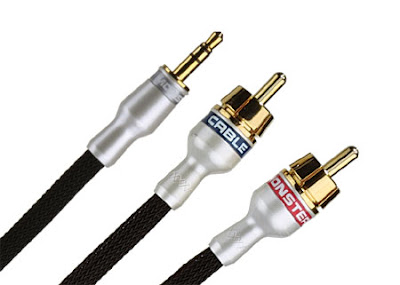

so set it up so you have the cables running into your computers mic slot or line-in and run eac -> tools -> 'record wav'. you should be able to see levels, but if you can't try going into the volume control panel and go to properties -> recording controls and select the line-in checkbox


after you get the levels, just let it record the whole tape, both sides, and then select 'process wav'

in the 'process wav' tool, first delete the leading and ending silence, but not the silence on the tape though, just the silence that is recorded when the tape wasn't even playing. then you place the 'track start' and 'gap start' markers to create a 'cue sheet'. track changes are marked by 'silence' on the tape, and the silence is much easier to see if you use the spectral view instead of the waveform view (view -> spectral).


inserting track start markers generates track n index 1 and gap markers generate track n index 0. insert a track start at the beginning of the tape's first song, and change the first marker marked track 1 index 1 into track 1 index 0 (effectively making the beginning of the recording a pregap until the first song). I also make the end of the tape silence a whole track that I edit into the cue sheet as a postgap.

go through the whole tape and then you basically get a cue sheet that looks like this


tell eac to save this cue sheet and the open it in a text editor to make sure it's correct (sometimes it doesn't export the gaps correctly, or some of the gaps correctly! see [3] you might have to manually edit the cue sheet, the syntax is easy enough) after you have saved the cue sheet then load cuetools and use the default settings

audio output - wav
output style - gaps left out


this will generate all the tracks
Directory of C:\Music\Kites - 2007 - Deny 1\New

01.wav
02.wav
03.wav
04.wav
05.wav
06.wav
07.wav
08.wav
09.wav
CUESheet.cue
the final step is to tag the files and compress the wav. use either musicbrainz or foo_discogs to tag the files, and either foobar2000's converter utility or eac to compress the wav's.

my favorite way to do it is to load the cue sheet into foobar, select the cue sheet and tag it with the foo_discogs plugin, this writes the track metadata into the cue sheet, and then you can give the cue sheet to eac and it outputs the compressed files with properly formatted filenames!

I hope this can help you create proper rips of your music, either with your cassettes or your vinyl

Monday, August 3, 2009

corruption 2


corrupting every frame of a video movie and re-encoding it. source video is some video feedback with high-def digital camera, music is made from some fm synth effects

Wednesday, July 29, 2009

fractals

I got this book called 'chaos in wonderland' and decided to try out mathematica to create some of the fractals in the books. the fractals are 'dynamical systems' described by basically differential equations (x[n+1] can be thought of as a discrete form of dx) [1]

x[n+1] = sin(y[n]*a) + c*sin(y[n]*b)
y[n+1] = sin(x[n]*a) + d*sin(y[n]*b)

my first attempt at code

ListPlot[Table[
xn = N[Sin[y*b] + c*Sin[x*b]];
yn = N[Sin[x*a] + d*Sin[y*a]];
{x = xn, y = yn},
{i, 0, 10000}]]


this worked great. but to create a more functional style of iterated programming, I use the nestlist function which creates a list {x, f(x), f(f(x)), ...}, however instead of the one parameter 'x', I have parameters {x, y}. to deal with this I have to pass nested lists that I flatted at the end

Iter[list_] :=
{
{{x, y}} = list;
xn = N[Sin[y*b] + c*Sin[x*b]];
yn = N[Sin[x*a] + d*Sin[y*a]];
{xn, yn}
}

FSystemsPlot[l_, ax_, bx_, cx_, dx_] :=
{
a = ax; b = bx; c = cx; d = dx;
list = NestList[Iter, {{0.1, 0.1}}, 10000];
ListPlot[Flatten[list,1]]
}]


the book had a list interesting parameters for this system that created these graphs

http://img198.imageshack.us/g/image10jhh.png/

Tuesday, July 28, 2009

someone has set us up the bomb

a new hack is going around that checks what sites you've been too. guess how? the script has a little database of sites and it just checks whether the link is the changed color of when it has been visited

 var link = document.createElement("a");
link.id = "id" + i;
link.href = websites[i];
link.innerHTML = websites[i];

document.body.appendChild(link);
var color = document.defaultView.getComputedStyle(link,null).getPropertyValue("color");
document.body.removeChild(link);

if (color == "rgb(255, 0, 0)") // the site has been visited :)


demo - http://ha.ckers.org/weird/CSS-history-hack.html

Monday, July 27, 2009

foobar last.fm radio

so, I just found this component that plays last.fm radio straight from foobar, and i couldn't control my love. beautiful!!! it constantly updates a playlist of like 4-7 songs from the last.fm radio, and you can play any of those tracks. i never listened to the last.fm radio before this, but playing 'your personal last.fm radio' from foobar is awesome!!!

http://www.unkempt.co.uk/fb2k/foo_lastfm_radio.html